Integrate a vehicle or gatewayLink to the section Integrate a vehicle or gateway
On this page
A UNIVIP Device adapts a vehicle's native capabilities to a shared interface. It can run in firmware, a controller app or a gateway server. Start with the simulator to see a complete connection before working with an adapter.
Choose where the Device runsLink to the section Choose where the Device runs
The same Client-facing interface can run in any of these software hosts.
-
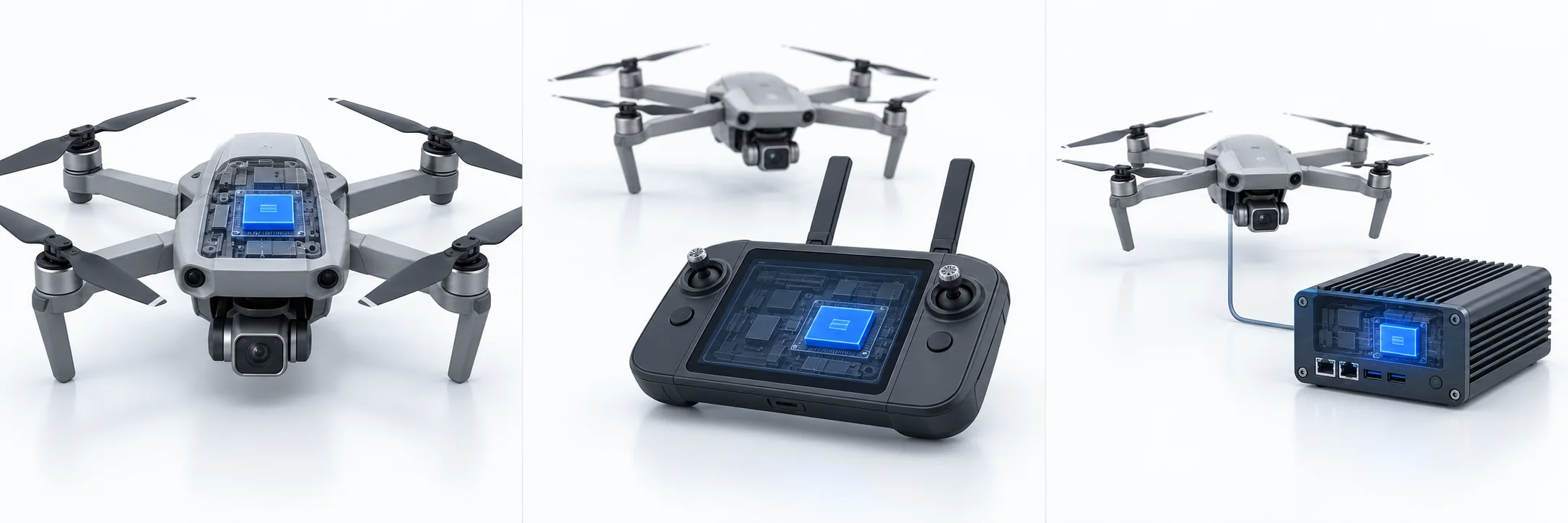
Native
UNIVIP runs in vehicle or dock firmware.
-
Controller
UNIVIP runs in a controller app or companion computer.
-
Gateway
An adapter server translates the vehicle's native interface.
Concept illustration · UNIVIP v0.2 working draft. The blue highlight identifies the software host. Choose one deployment mode; these are alternatives. Open full illustration.
| Mode | Where it runs | When to use it |
|---|---|---|
| Native | Vehicle or dock firmware | You can implement the protocol in the device software |
| Controller | Controller, pilot app or companion computer | The controller already has access to the vehicle and payload |
| Gateway | Server translating the native API | You need an adapter independent of a firmware change |
The architecture specification defines the same Client-facing behavior for all three.
Advertise what the vehicle supportsLink to the section Advertise what the vehicle supports
Give each vehicle a stable Device identity and build its capability document from actual adapter support. Start with Profile S. Add C for advertised camera controls and N for separately enabled vehicle tasking; C and N independently require S.
Read Profiles, Identity and Capabilities. Do not advertise a gimbal axis by implementing it as vehicle motion.
Connect and publish stateLink to the section Connect and publish state
Configure the Client endpoint, trust and credentials. Open the authenticated session, complete hello and welcome, verify the configured Client identity, and publish capabilities before telemetry and events. Implement the session proxy if the Device does not host its own REST listener.
Use Telemetry, Events and Media to preserve units, time references, event state and video alignment. Report stale sources explicitly.
Add authorized controlsLink to the section Add authorized controls
Gate commands on advertised capabilities and separate camera and vehicle scopes. Vehicle tasking also requires operator enablement, a vehicle lease and the controller's safety checks. Follow the command lifecycle through its outcome.
The requirements are in Camera control, Vehicle control and Security.
Use the reference adapters and validationLink to the section Use the reference adapters and validation
The Python gateway includes simulator, MAVLink and DJI Cloud API adapters. The .NET gateway provides an ASP.NET Core implementation with the simulator adapter.
Review implementation findings, SITL evidence and the conformance requirements before describing integration results.